Comments

记录一下问题解决。

上周买了个4K的显示器,在收到试用是可以正常使用的,新显示器能收到信息,只是刷新率只能30Hz。

后来,纠结于 30HZ 的问题,期间折腾了很久,也没有解决,最后在网上下单一条 typec 转 dp1.4 的线。目前,还没有收到。

但是,今天发现 4K 显示器一直提示没有信号,但能正常通电。

所以问题是:之前能正常显示,现在能通电,但没有信号,什么问题?

我的电脑是有集成显卡和独立显卡的 mac 笔记本电脑,所以,在尝试来回换线之后,还是未能有信号。

思考:是否可能是最近折腾,将默认的自动切换显卡 调整为 集成显卡。

结果,还真是。

这是调整显卡的命令:

1
2
3
4
5
6
7
8
9
10
11
12
13
# 强制使用集成显卡
sudo pmset -a GPUSwitch 0

# 强制使用独立显卡
sudo pmset -a GPUSwitch 1

# 自动切换显卡
sudo pmset -a GPUSwitch 2

# 当前显卡的使用状态
pmset -g

查看 gpuswitch 对应值,0 是集成显卡,1 是独立显卡,2 是自动切换

前几天,为了尝试独立显卡是否能将 4K 显示器调整为 60Hz,所以调整了上面的命令,但是没有变化。后来,觉得没有变化,直接将值设置为 0,也就是集成显卡。

而且,Mac的显卡设置并不会立即生效,所以当时没有问题。今天,电脑重新启动,是以集成显卡启动了,所以 4K 显示器没有信号了。

将显卡设置为自动切换,4K显示器就可以正常有信号了。

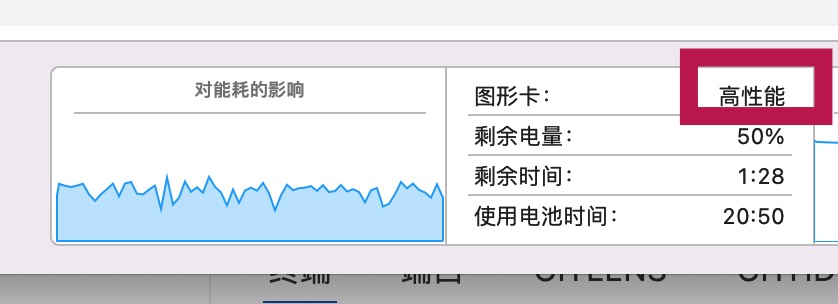
系统是否使用独立显卡,看 Mac 电脑的能耗中,有

Jietu20251129-105548.jpg

高性能的意思就是独立显卡。

记录一下使用 sqlalchemy-migrate 的问题。

官网: https://sqlalchemy-migrate.readthedocs.io/en/latest/download.html

说明

在寻找 python 层面,类 rails migration 的工具,发现了 sqlalchemy-migrate。 大致看着还可以,尝试使用中。

下载

1
pip install sqlalchemy-migrate

安装成功后,应该可以运行

1
migrate help

可以查看 migrate 脚本支持的功能命令。

使用

根据官网说明,手动尝试运行,但遇到了些问题。

创建迁移项目目录

1
migrate create migration "Example project"

此命令会创建一个迁移项目的文件夹 migration,里面包含有 versions 目录、manage.py、manage.cfg 文件。

构建数据库的基本结构

官网上,有

1
$ python migration/manage.py version_control mysql+mysqldb://root:@localhost/activity?charset=utf8mb4 migration

官网上说,这命令会在相应的数据库中增加版本控制的表 migrate_version。但在我的机器中,会出现错误

1
2
3
4
Traceback (most recent call last):
  File "migration/manage.py", line 2, in <module>
    from migrate.versioning.shell import main
ModuleNotFoundError: No module named 'migrate'

查阅文件 migration/manage.py 文件,

1
2
3
4
5
#!/usr/bin/env python
from migrate.versioning.shell import main

if __name__ == '__main__':
    main(debug='False')

报错没有正常找到 migrate 包,折腾了许久,没有找到有效的解决方案。 但本质上,migration/manage.py 文件也是使用 migrate 命令去实现迁移操作的, 所以,尝试手动使用 migrate 命令去实现数据迁移。

1
migrate version_control mysql+mysqldb://root:@localhost/activity?charset=utf8mb4 migration

运行上面的命令之后,查看数据库,会发现有数据表 migrate_version。

查看当前版本

1
2
migrate db_version mysql+pymysql://root:@localhost/activity?charset=utf8mb4 migration
# 0

创建迁移脚本

创建迁移脚本使用 script 命令实现

1
migrate script "add init tables" migration

命令会生成文件 migration/xxx_add_init_tables.py 文件,xxx 可以是 001 增序编号,也可以是日期时间。

查阅文件,有

1
2
3
4
5
6
7
8
9
10
11
12
13
from sqlalchemy import *
from migrate import *


def upgrade(migrate_engine):
    # Upgrade operations go here. Don't create your own engine; bind
    # migrate_engine to your metadata
    pass


def downgrade(migrate_engine):
    # Operations to reverse the above upgrade go here.
    pass

遇到问题:使用timestamp做为文件名前缀时,migrate包的部分版本处理有错误,建议使用普通数字。

增加一个 users 表, 有代码

1
2
3
4
5
6
7
8
9
10
11
12
13
14
15
16
17
18
19
from sqlalchemy import *
from migrate import *

meta = MetaData()
account = Table(
    'account', meta,
    Column('id', Integer, primary_key=True),
    Column('login', String(40)),
    Column('passwd', String(40)),
)

def upgrade(migrate_engine):
    meta.bind = migrate_engine
    account.create()


def downgrade(migrate_engine):
    meta.bind = migrate_engine
    account.drop()

例子中,利用 sqlalchemy 构建表,并分别定义了 upgrade 、downgrade 方法。方法中,分别对 account 表进行了创建或删除。

代码中定义了表,需要将表落实到数据库中,运行命令

1
migrate upgrade mysql+pymysql://root:@localhost/activity?charset=utf8mb4 migration

命令会直接在数据库创建相应的表。

想删除表,可以执行

1
migrate downgrade mysql+pymysql://root:@localhost/activity?charset=utf8mb4 migration 0

0 表示要回滚到的版本。

在与后台理顺授权、登录逻辑之后,就开始小程序的页面结构开发了。

既然用上了 vant,所以也就直接拿来用了 https://youzan.github.io/vant-weapp/#/tabbar。

使用vant组件库的好处,不用自己画图标,这对于一个开发人员的我来说,很重要不用自己自己画图标啊,自己画的是神马连自己都不知道。所以,带图标库的组件库,是令我非常欢喜的。

tabbar的使用需要结合wx小程序的官方文档 https://developers.weixin.qq.com/miniprogram/dev/framework/ability/custom-tabbar.html

在 app.json 声明 tabbar

1
2
3
4
5
6
7
8
9
10
11
12
13
14
"tabBar": {
  "custom": true,
  "backgroundColor": "#ffffff",
  "list": [{
    "pagePath": "pages/about/about",
    "text": "关于"
  }, {
    "pagePath": "pages/home/home",
    "text": "首页"
  }, {
    "pagePath": "pages/my/my",
    "text": "我的"
  }]
},

wx对自定义的tabbar有相应的介绍,在代码根目录下添加入口文件

1
2
3
4
custom-tab-bar/index.js
custom-tab-bar/index.json
custom-tab-bar/index.wxml
custom-tab-bar/index.wxss

需要在 custom-tab-bar/index.json 中,增加 vant 依赖

1
2
3
4
"usingComponents": {
  "van-tabbar": "@vant/weapp/tabbar/index",
  "van-tabbar-item": "@vant/weapp/tabbar-item/index"
}

在 custom-tab-bar/index.wxml 增加

1
2
3
4
5
<van-tabbar active="" bind:change="onChange">
  <van-tabbar-item icon="search">关于</van-tabbar-item>
  <van-tabbar-item icon="home-o">首页</van-tabbar-item>
  <van-tabbar-item icon="search">我的</van-tabbar-item>
</van-tabbar>

在 custom-tab-bar/index.js 增加

1
2
3
4
5
6
7
8
9
10
11
12
13
14
15
16
17
18
data: {
  selected: 0,
  list: [
    "/pages/about/about",
    "/pages/home/home",
    "/pages/my/my"
  ]
}
...
{
  methods: {
    onChange(event) {
      const selected = event.detail
      this.setData({ selected })
      wx.switchTab({ url: this.data.list[selected]})
    }
  }
}

这里有会问题,tabbar的激活状态是不能正常显示的。

实际上 switchTab 切换过去时,会实例化一个 tabbar,实例化的新 tabbar 中的 selected 会默认为 0,所以会有这一问题。

wx 提供了 getTabbar() 方法来获取当前页面的 tabbar。所以,需要在 Page 完成初始化之后,调用

1
2
3
4
5
6
// /pages/about/about
Page({
  onShow: function() {
    this.getTabBar().setData({selected: 0})
  }
})

需要在每一个页面的 onShow 方法都调用一次,设置上不同的 selected 的值。但是,怎么才能自动地选择正确的 selected 的值呢?可以通过路由判断。怎么获取当前页面的路由呢?

注意到了 vant 示例中有代码块,帮忙解决了问题。

wx 可以通过 getCurrentPages() 得到 App 的页面栈。

PageObject[] getCurrentPages() 获取当前页面栈。数组中第一个元素为首页,最后一个元素为当前页面。

1
2
3
4
5
6
7
8
9
10
11
// custom-tab-bar/index.js 
// 在 methods 里增加
{
  methods: {
    init: {
      const page = getCurrentPages().pop();
      const selected = this.data.list.findIndex(item => item === `/${page.route}`)
      this.setData({ selected })
    }
  }
}

所以,可以将tab页面的 onShow 中的代码调整为

1
this.getTabBar().init()

即可,统一让 tabbar 的内部方法去处理 selected 的值。

但是,这样会有一个问题,Page 每次切换的时候,都会重新设置这个 selected 值,如果页面都自有 tabbar,能不能只设置一次呢?页面每次加载时会不会重新构建 tabbar 实例呢?

但是,通过日志查看,getTabBar() 中的 __wxWebviewId__ 是不变的,但奇怪的是 tabbar 中的 selected 的值是相互影响的。

即,切换过的 tab 页面后,三个页面只有三个 __wxWebviewId__的值,无论切换几次。但,如果从tab1切换到tab2后,在 Page => this.getTabBar().init() => this.selected 的值会是0, 而不是之前 tab2 实例化过的selected 值 1。

tabbar中的 __wxExparserNodeId__ 的值是三个,和 __wxWebviewId__ 是对应、固定的,难道 wx 对 tabbar 进行了 data 域的数据共享?

tabbar 挂载到页面上,会单独生成,不会重新生成,但会存在 data 域的数据共享。

另外在社区中发现,可以通过 Component 替换 Page,通过使用 Component 的 pageLifetimes => show方法来达到 Page 中的 onShow 效果。

可能会有很多坑吧,一个一个记录下来

小程序出来不长时间的很久之前,做了一个“丢丢测运”的小程序,没有后端的逻辑;全部使用前端进行计算操作。 当初,纯粹地想体验一下小程序的开发过程。但当时的那个对我来说,只是简单的前端开发,没有真正使用到wx提供的任何API。

最近,在折腾一下小程序,记录下来踩坑的过程吧。


折腾之前,跟朋友了解到,现在比较多的使用到的第三方的组件库有 vant。之前小程序使用的是官方的组件,页面相对简单,这次就使用 vant 组件。

好,第一坑就是来自 vant。

在使用wx开发工具,构建好一个小程序时候,需要安装 vant 组件库,相关参照 https://youzan.github.io/vant-weapp/#/quickstart。

1
2
3
4
5
6
7
* npm i @vant/weapp -S --production
* 开发工具上构建 npm

<!-- 如果没有成功,尝试以下过程 -->
* npm init # 重新初始化
* npm i @vant/weapp -S --production
* 开发工具上构建 npm

看过小程序的官网,应该知道,安装组件时建议使用 production 以减少包大小。“构建 npm”的作用是,将 node_modules 的依赖包,复制到 miniprogram_npm 目录中。(想到了什么呢,其实手动走这个流程应该也是可以的,不过我没有尝试过)

vant 在示例网站上,显示的使用是1.x,但实际上我安装后的版本是 0.5.x。部分组件是不存在的,node_modules下的组件目录结构也是不一样的。

使用指定版本安装,提示说没有找到,很尴尬。后来直接在 package.json 中指定资源的 github 链接,是能下载下来了。当时的最新版本是 v1.2.0,这是一个有坑的版本。

问题类似于 https://github.com/youzan/vant-weapp/issues?q=bem , 可能是团队在兼容wepy时引入的问题,由于时间关系没有去细究,社区也比较活跃,修复应该也比较快的。

果不其然,github然后连续出了 0.5.28 的版本,后又出了 1.2.1 的版本,修复了相关问题。

这,就是使用第三方组件库带来的风险。上手就遇到组件库的问题,比较打击人的动力啊。 所以,在选择引入第三方库时,需要考虑库的活跃度的问题,慎重。

Comments

朋友需要帮忙,使用地图进行数据的展示。网上,不少人使用 mapbox,看了些示例与文档,手动折腾了一下,确实是强大。

下面将折腾的过程记录下来。

先说一下需求:朋友需要对某个城市的路线中的一些路线进行颜色的特殊标识,比如,广州有很多道路,需要将有包含人名的道路标识出来。另外,人名分男女,用不同颜色进行区分显示。

地图信息,本质是不同图层的叠加,比如地形图、卫星图、道路图等,需要显示哪些图层,勾选就可以,也可以同时显示多个图层,它们会叠加,类似ps。

那么,要实现需求,需要完整的广州道路图、标识的道路图。

  • 第一步,我们需要现有的广州道路的地图,一个底图。

翻阅了官网,发现一个浅色系的地图 mapbox://styles/mapbox/light-v9,这个地图适合当背景,这样标识的道路图可以选择较亮眼的颜色。

  • 第二步,需要有标识人名道路的图层。

怎么拥有这个图层呢?首先,需要理解,图层的本质是道路的数据,只要有道路的数据就可以了。

那么怎么有需要标识的道路数据呢?如果别人整理过,可以直接拿geo的坐标数据集。但是,一般人不会刚好想到你的需求,刚好整理了出来,刚好分享到网络上。

由于是自己选择的道路,所以数据需要自己整理,Mapbox 这点就很好了。地图道路的数据实际上是一系列的坐标点,Mapbox 允许你直接在地图在通过画线,来得到这些数据。也就是,可以通过直观的操作,得到geo的数值数据。

mapbox 有 dataset 和 tileset 的概念, dataset 就是数据集,tileset贴图集。dataset 就是用来存储标志的路线坐标数据的, 如果直接使用数值数据渲染,可以足够了。

在 mapbox 需要通过网络使用 dataset,需要生成相应的 tileset 才能使用。在 https://studio.mapbox.com/datasets 在查看自己的 dataset,在 https://studio.mapbox.com/tilesets 在查看自己的 tileset。


那么,先看看直接使用数值数据的例子。在这个例子中,需要将 dataset 中的坐标值,手动复制到相应的代码块中,效果见 index.html

1
2
3
4
5
6
7
8
9
10
11
12
13
14
15
16
17
18
19
20
21
22
23
24
25
26
27
28
29
30
31
32
33
34
35
36
37
38
39
40
41
42
43
44
45
46
47
48
49
50
51
52
53
54
55
56
57
58
59
60
61
62
63
64
65
66
67
68
69
70
71
72
73
74
75
76
77
78
79
80
81
82
83
84
85
86
87
88
89
90
91
92
93
94
95
96
97
98
99
100
101
102
103
104
105
106
107
108
109
110
111
112
113
114
115
116
117
118
119
120
121
122
123
124
125
126
127
128
129
130
131
132
133
134
135
136
137
138
<!DOCTYPE html>
<html>

<head>
  <meta charset='utf-8' />
  <title>Display a map</title>
  <meta name='viewport' content='initial-scale=1,maximum-scale=1,user-scalable=no' />
  <script src='https://api.tiles.mapbox.com/mapbox-gl-js/v0.49.0/mapbox-gl.js'></script>
  <link href='https://api.tiles.mapbox.com/mapbox-gl-js/v0.49.0/mapbox-gl.css' rel='stylesheet' />
  <style>
    body {
      margin: 0;
      padding: 0;
      height: 100%;
      width: 100%;
    }

    /* 外部div样式 */
    #container {
      margin: 20px auto;
      width: 800px;
      height: 400px;
      position: relative;
    }

    #map {
      position: absolute;
      top: 0;
      bottom: 0;
      width: 100%;
    }
  </style>
</head>

<body>
  <!-- 增加外部div,限制高宽 -->
  <div id="container">
    <div id='map'></div>
  </div>

  <script>
    mapboxgl.accessToken = 'pk.eyJ1Ijoic2hhdGxlIiwiYSI6ImNqczF4NzgxdTA3dnc0NHA4aG5sdDk3Y2gifQ.Mr3uL3avjz6PD6zkCvwxPw';
    const map = new mapboxgl.Map({
      container: 'map',
      style: 'mapbox://styles/mapbox/light-v9', // 这是灰色地图
      center: [113.374233, 23.137433],
      zoom: 15
    });

    // 当 map 地图加载完成后,添加图层
    // 下面数据有三个特征 feature 数据, 一个是红色的路线,两个是天蓝色的路线
    // 可以通过js来控制加载哪些特征数据,就可以做到区别显示了
    map.on('load', function () {
      // 红色
      map.addLayer({
        'id': 'redlines',
        'type': 'line',
        'source': {
          'type': 'geojson',
          'data': {
            'type': 'FeatureCollection',
            'features': [{ // 这里是红色 dataset 
              'type': 'Feature',
              'properties': {
                'color': '#F7455D' // red
              },
              'geometry': {
                'type': 'LineString',
                'coordinates': [
                  [113.371858, 23.137009],
                  [113.37309, 23.136758],
                  [113.373807, 23.1366],
                  [113.374053, 23.136553]
                ]
              }
            }]
          }
        },
        'paint': {
          'line-width': 3,
          'line-color': ['get', 'color']
        }
      });

      // 天蓝
      map.addLayer({
        'id': 'bluelines',
        'type': 'line',
        'source': {
          'type': 'geojson',
          'data': {
            'type': 'FeatureCollection',
            'features': [{ // 这里是天蓝 dataset 
                'type': 'Feature',
                'properties': {
                  'color': '#00ffff'
                },
                'geometry': {
                  'type': 'LineString',
                  'coordinates': [
                    [
                      113.37421857524919,
                      23.13651914382298
                    ],
                    ...
                  ]
                }
              },
              { //这里是天蓝 另外一条路线
                'type': 'Feature',
                'properties': {
                  'color': '#00ffff'
                },
                'geometry': {
                  'type': 'LineString',
                  'coordinates': [
                    [
                      113.37539098241979,
                      23.13607741667701
                    ],
                    ...
                  ]
                }
              }
            ]
          }
        },
        'paint': {
          'line-width': 3,
          'line-color': ['get', 'color']
        }
      });
    });
  </script>

</body>

</html>

由于后期还需要区分操作显示,再次过了一下官网上的例子,有通过按钮点击,切换显示不同路线图层的方法,另外还有直接使用 tileset 进行异步请求数值数据的方法,不用复制数值数据了,效果见 switch.html

1
2
3
4
5
6
7
8
9
10
11
12
13
14
15
16
17
18
19
20
21
22
23
24
25
26
27
28
29
30
31
32
33
34
35
36
37
38
39
40
41
42
43
44
45
46
47
48
49
50
51
52
53
54
55
56
57
58
59
60
61
62
63
64
65
66
67
68
69
70
71
72
73
74
75
76
77
78
79
80
81
82
83
84
85
86
87
88
89
90
91
92
93
94
95
96
97
98
99
100
101
102
103
104
105
106
107
108
109
110
111
112
113
114
115
116
117
118
119
120
121
122
123
124
125
126
127
128
129
130
131
132
133
134
135
136
137
138
139
140
141
142
143
144
145
<!DOCTYPE html>
<html>

<head>
  <meta charset='utf-8' />
  <title>Show and hide layers</title>
  ...
</head>

<body>

  <style>
    #menu {
      background: #fff;
      position: absolute;
      z-index: 1;
      top: 10px;
      right: 10px;
      border-radius: 3px;
      width: 120px;
      border: 1px solid rgba(0, 0, 0, 0.4);
      font-family: 'Open Sans', sans-serif;
    }

    #menu a {
      font-size: 13px;
      color: #404040;
      display: block;
      margin: 0;
      padding: 0;
      padding: 10px;
      text-decoration: none;
      border-bottom: 1px solid rgba(0, 0, 0, 0.25);
      text-align: center;
    }

    #menu a:last-child {
      border: none;
    }

    #menu a:hover {
      background-color: #f8f8f8;
      color: #404040;
    }

    #menu a.active {
      background-color: #3887be;
      color: #ffffff;
    }

    #menu a.active:hover {
      background: #3074a4;
    }
  </style>

  <div id="container">
    <nav id="menu"></nav>
    <div id="map"></div>
  </div>

  <script>
    mapboxgl.accessToken = 'pk.eyJ1Ijoic2hhdGxlIiwiYSI6ImNqczF4NzgxdTA3dnc0NHA4aG5sdDk3Y2gifQ.Mr3uL3avjz6PD6zkCvwxPw';
    var map = new mapboxgl.Map({
      container: 'map',
      style: 'mapbox://styles/mapbox/light-v9',
      zoom: 15,
      center: [113.374233, 23.137433]
    });

    map.on('load', function () {
      map.addSource('red', {
        type: 'vector',
        url: 'mapbox://shatle.cjs1z8leu4hge2xpkx5s9faxa-814td' // 这个是 tileset 中的 Map ID
      });
      map.addLayer({
        'id': 'red',
        'type': 'line',
        'source': 'red',
        'source-layer': 'lcm-test',  // 这个是tileset 中的一图层名称
        'layout': {
          'visibility': 'visible',
          'line-join': 'round',
          'line-cap': 'round'
        },
        'paint': {
          'line-color': '#ff0000',
          'line-width': 1
        }
      });
      // 同理上一个数据,构建第二个分类数据
      map.addSource('blue', {
        type: 'vector',
        url: 'mapbox://shatle.cjs3g5w7k01us2wmudbbgjxks-6t25j'
      });
      map.addLayer({
        'id': 'blue',
        'type': 'line',
        'source': 'blue',
        'source-layer': 'lcmtest2',
        'layout': {
          'visibility': 'visible',
          'line-join': 'round',
          'line-cap': 'round'
        },
        'paint': {
          'line-color': '#00ffff',
          'line-width': 1
        }
      });
    });

    var toggleableLayerIds = ['red', 'blue'];

    for (var i = 0; i < toggleableLayerIds.length; i++) {
      var id = toggleableLayerIds[i];

      var link = document.createElement('a');
      link.href = '#';
      link.className = 'active';
      link.textContent = id;

      link.onclick = function (e) {
        var clickedLayer = this.textContent;
        e.preventDefault();
        e.stopPropagation();

        var visibility = map.getLayoutProperty(clickedLayer, 'visibility');

        if (visibility === 'visible') {
          map.setLayoutProperty(clickedLayer, 'visibility', 'none');
          this.className = '';
        } else {
          this.className = 'active';
          map.setLayoutProperty(clickedLayer, 'visibility', 'visible');
        }
      };

      var layers = document.getElementById('menu');
      layers.appendChild(link);
    }
  </script>

</body>

</html>

Comments

去年,项目组事情比较多,每个人的工作量都有些大,经常加班深夜,导致整体团队都很累,所以,急需招入小伙伴。 在之前的前端人员离职之后,增加开发人员越加紧迫。下面,整理一下面试的体会。

个人总结

参与的是技术面试,应试人员过来时会有一份笔试。当应试人员完成试卷时,我们才下去进行真正的面试。 我作为一个辅助的技术面试人员,主要是补充提问。

在面试的过程中,上级领导也给出了些不少的建议,指出改进的地方。

个人介绍

初期,作为技术面试,上来就会对应试人员进行题面的提问。 这里有个问题,忽略了人的基本属性。招聘进来的是人,一个需要参与团队的人,而不是简单的一个技术机器。

个人介绍,通常可以提前准备,也可以没有准备。但无论如何,从中都可以看出应该的基本语言表达能力。或者,如果连这准备都没有,可以看出是否重要此次的面试。

在应试人员的自我介绍时,只需要简单的抓住关键点,了解其基本表达能力。同时,面试人员可以快速的浏览其做题的情况,在心里有个大概的提问方向。

笔试提问

前端的题面,包括js/css/jQuery的基础、算法、工作常遇到的问题等。

js基础,可以看出应试人员在开发过程中的细心程度,但通常工作之后的应试人员表现得都不是很理想,反而是实习生在答案上表现得优异。

做为过来人,是知道其原因的,也很容易理解。实习生有足够的时间来准备各种面试,而还在工作的应试人员就不一样,他们需要完成正常工作中的任务。

需要找到一个基础很好,又有工作经验的人,也不是简单地找一个年限够长的在职人员。关键在于,应试人员是否有意识去注意使用中的细节。

算法,应试人员基本都不怎么样,反而是实习生会好些。前端的工作,了解需求,对接后端的接口,并实现设计人员的交互,最大限度地提升用户体验。通常来说,后端返回的数据会避免过大的数据,以便于处理,致使前端的算法机能表现弱些。

在编程时还是需要注意细节,比如循环与零比较都是可以作为优化的点。现在编程中,习惯使用与underscode类似的lodash进行各操作,ES6也提供了较先进的方法,但最终还是希望有优化编辑的意识。

其中,令我好奇的是,有些人一直使用for循环,而不去寻找更为方便的underscore/lodash工具进行数据处理,这是不是也反应出一部分人对编程没有优化/简化的想法。

工作中遇到的问题,比如如何避免附件缓存等,都是常见的问题。如果实在没有遇到,也是考验应试人员的一个点。但如果面试过程良好,还会话面时进行相关提问。

笔试提问,可以看到应试人员基技术基础好不好,还可以看到其快速理解力,及对题目回答的表达能力等。工作中,这些都是基础的。

话面

抛开题目,进入话面。希望看到应试人员几点:

  • 生活方面是否适合当前团队。

    应试人员是哪里人,现居住在哪里。作为一个开发人员,工作中可能会有些意料不到事情,是否可以快速反应并到场解决问题。

    工作肯定会有各方面的压力,通常是怎么释放的。工作之余有什么爱好,比如运动、聚会什么的,也是值得参考的。即使碰到对编程极度热爱的人员,通常也会喜欢听歌、看电影。

    是否结婚,有无男女朋友,对象的工作地点,这些也会对是否成功入职有一定的影响,所以也是需要考虑的。

  • 技术知识点是否是团队需要的。

    技术知识点太多,首先会在简历上做了一层过滤,这可以过滤大部分的不是团队需要的人员。

    另外,出于开放的原则,会对部分未完全匹配的简介给予面试的机会,希望能够找出优秀的人员。

    比如,工作中只使用过 AngularJS 或 VueJS,而现有的工作需求是 React,那么也会给予机会面试。毕竟,很多框架类的东西是相通的。但,没有 React 项目经验的人员,需要注意提问其掌握框架的大致时间,了解其学习、快速上手的能力。

    如果掌握需求匹配的技术,还需要深入的了解技术细节,实践过程中遇到的问题和解决方法。

  • 理解问题能力

    理解问题,可以从笔试部分了解到。遇到些应试人员,在做笔试部分时就没有读懂题目。这原因可能是一时的疏忽,但本人觉得更多的是没有相应的知识概念,这点并不可耻,毕竟每个人的知识范围都是有限的。

    在话面过程中,我们也会提到一些技术或者其它的问题。通常,这些问题都是根据应试人员的经历来进行提问的,也有些关联性可能较远的问题,试图去了解到应试人员对熟悉领域中的问题是否有快速的反应能力,对不熟悉领域是否有解决和求知的欲望。

  • 正常沟通能力

    沟通能力,这是必须的,也是很重要的。

Comments

最近的炒币

最近,有同事比较热衷于炒虚拟币,都是打着区块链的技术,炒各种概念币种。

同事炒了国内的一个井通币,投入几千块钱,翻倍回来了,羡慕这敢行动的行为。

于是,自己也下载了些炒币应用,有火币、OKex、井通这三个,还有其它小的应用。

火币和OKex的交易应用上线美国地区的苹果商店;井通的应用没有上线苹果商店,也没有交易平台;其它只是用来跟进比较,没有使用。

井通币升到0.28时,我想跟进同事的脚步的,但是井通平台的充值只能通过QQ进行转账。确实比较山寨,我在联系充值客服时,没有成功,结果没有充上。结果,第二天就开始下跌了,直到今天0.06左右。

虽然有些庆幸没有入井通这一个坑,但是,我并不因此觉得自己多明智。我在意的是,为什么我没有进去的勇气?

于是上周末,我逼了自己一下,通过火币网卖了1500元的USDT币。但是,很多币币交易只能使用BTC和ETH进行交易,所以我又用USDT买了ETH,由于钱太少了,买不了多少的BTC,交易起来前面的小数点太多。

在买USDT之后,由于USDT的价格比国家的汇率要高很多,所以,买完之后,显示的价值已经少了100多块了。接着,交易ETH之后,手续费需要0.2%,同时当前的ETH又在下跌,整体看,少了二百多块。

前段时间我得到的结果时,只有新币发行时,才会有比较大的上涨幅度,类似于新股上市;发行比较久的币种上涨比较小,并且多数是在下跌的。

所以,只买卖新币种

不幸的是,整体的币种价值在下跌,我的原始资本一直在消耗。所以,决定开始行动。

中午,12点有发行新币种 THETA,我晚些进场,没有赶上较低的时候,当前已经比发行价上升了30%多。我直接买进,十几分钟后,在发行价45%左右出手,换回了ETH,赚了点。

下午2点又有新币种LET,根据上个经验,我快手地进入效果界面,直接交易出了所有的 ETH,但是,我回头一看,当前的涨幅已经是发行价的200%以上了,不到一分钟,就这个状态了,当我意识到时,已经下跌到60%多了,价值直接扣半,后悔。

买卖不能心急,宁愿错过,不能做错

需要看清本质,翻两倍肯定是危险的,不可取的。三天不到,资产减过半。

做事要勇敢,不能心急,但不要怯于尝试

Comments

react-dnd 简析 2

上篇文章有说到场景:卡片在不同的容器之间来回拖动。下面,对上篇文章中的代码整理一下:

上期代码

1
2
3
4
// ItemTypes
const ItemTypes = {
  CARD: 'Card'
}
1
2
3
4
5
6
7
8
9
10
11
12
13
14
15
16
17
18
19
20
21
22
23
24
25
26
27
28
29
30
31
32
33
34
35
36
37
38
39
40
41
// Card
const Card = React.Component {

  constructor(props) {
    super(props);
  }

  render() {
    const { children, id, text, connectDragSource } = this.props;
    return connectDragSource(
      <div  className={styles.card} >
        {text}
      </div>
    );
  }
}

const cardSource = {
  beginDrag(props) {
    return {
      id: props.id,
      index: props.index,
      text: props.text,
      boxId: props.boxid
    };
  },
  isDragging(props, monitor) {
    return props.id === monitor.getItem().id;
  }
};

function dragCollect(connect, monitor) {
  return {
    connectDragSource: connect.dragSource(),
    isDragging: monitor.isDragging()
  };
}

let DragCard = DragSource( ItemTypes.CARD, cardSource, dragCollect)( Card)

export default DragCard
1
2
3
4
5
6
7
8
9
10
11
12
13
14
15
16
17
18
19
20
21
22
23
24
25
26
27
28
29
30
31
32
33
34
35
// CardBox
class CardBox extends React.Component {

  constructor(props) {
    super(props);
  }

  render() {
    const { childrenconnectDropTarget } = this.props;
    return connectDropTarget(
      <div className={styles.cardBox}>
        { children }
      </div>
    );
  }
}

const cardBoxTarget = {
  hover(props, monitor, component) {
    const hoverCard = monitor.getItem();
    if (hoverCard.id && props.boxid != card.boxId){
      props.changeCard(hoverCard.index, props.boxid);
    }
  }
};

function dropCollect(connect, monitor) {
  return {
    connectDropTarget: connect.dropTarget()
  };
}

let DropCardBox = DropTarget(ItemTypes.CARD, cardBoxTarget, dropCollect)(CardBox)

export default DropCardBox
1
2
3
4
5
6
7
8
9
10
11
12
13
14
15
16
17
18
19
20
21
22
23
24
25
26
27
28
29
30
31
32
33
34
35
36
37
38
39
40
41
42
43
44
45
46
47
48
49
50
51
52
53
54
55
56
57
58
59
60
61
62
63
64
65
66
67
68
// Kanban

class Kanban extends React.Component {

  constructor(props) {
    super(props);

    this.state = {
      cards: [
        {id: 1, text: 'card 1', boxId: 1 },
        {id: 2, text: 'card 2', boxId: 1 },
        {id: 3, text: 'card 3', boxId: 2 },
        {id: 4, text: 'card 4', boxId: 2 },
      ],
      boxes: [
        {id: 1, boxId: 1},
        {id: 2, boxId: 2}
      ]
    }
  }

  changeCard(index, newBoxId) {
    const dragCard = this.state.cards[index]
    if (!dragCard){ return }

    dragCard.boxId = newBoxId

    this.setState(update(this.state, {
      cards: {
        $splice: [
          [index, 1],
          [index, 0, dragCard]
        ]
      }
    }));
  }

  render() {
    return (
      <div >
        { this.state.boxes.map( box => {
          return (
            <CardBox
              key={'cb-'+box.boxId}
              changeCard={this.changeCard}
              boxid={box.boxId}>
              { this.state.cards.map( (card, index) => {
                if (box.boxId==card.boxId)
                  return (
                    <Card
                      key={'c-'+card.id}
                      id={card.id}
                      index={index}
                      boxid={card.boxId}
                      text={card.text}
                      />
                  )
                else return '';
               })}
            </CardBox>
          )
        })}
      </div>
    );
  }
}

export default DragDropContext(HTML5Backend)(Kanban)

这四个文件,ItemTypes.js/Card.js/CardBox.js/Kanban.js 为基本的模型文件,样式文件应该也要有的,这里就贴了。

新需求

对于看板来说,不同容器间的来回拖动是必要的。同时,如果想在单个容器中上下拖动,又需要怎么实现?

由于上篇文章的changeCard(index, newBoxId)只能调整卡片的boxId的属性,并不能改变其同一容器中的上下位置,所以需要调整一下,

1
2
3
4
5
6
7
8
9
10
11
12
13
14
15
16
17
18
19
20
21
22
23
24
25
26
27
28
29
30
31
32
33
// 增加一个参数 newIndex
changeCard(index, newBoxId, newIndex) {
  const dragCard = this.state.cards[index]
  if (!dragCard){ return }

  if (newBoxId && dragCard.boxId != newBoxId) {
    dragCard.boxId = newBoxId

    this.setState(update(this.state, {
      cards: {
        $splice: [
          [index, 1],
          [index, 0, dragCard]
        ]
      }
    }));
  } else if (newIndex && index != newIndex) {
    // newIndex 当卡片拖动到某个卡片的上面时,
    // newIndex 就是此某个卡片的 index
    // 将拖动的卡片 剪切到 此位置上
    //
    // dragCard.index ~= newIndex

    this.setState(update(this.state, {
      cards: {
        $splice: [
          [index, 1],
          [newIndex, 0, dragCard]
        ]
      }
    }))
  }
}

通过调整 index 的值来达到位置上的变化。


当卡片拖动到另一卡片上面时,需要获取到这一卡片的 index 的值,再将拖动卡片设置到新的位置上。

那么,需要将Card设置为可接受的容器DropTarget

参考之前的CardBox,

1
2
3
4
5
6
7
8
9
10
11
12
13
14
15
16
17
18
19
20
21
22
23
24
25
26
27
28
29
30
31
32
33
34
35
36
37
38
39
40
41
42
43
44
45
46
const cardTarget = {
  hover(props, monitor, component) {
    const dragIndex = monitor.getItem().index;
    const hoverIndex = props.index;

    // Don't replace items with themselves
    if (dragIndex === hoverIndex) {
      return;
    }

    // Determine rectangle on screen
    const hoverBoundingRect = findDOMNode(component).getBoundingClientRect();

    // Get vertical middle
    const hoverMiddleY = (hoverBoundingRect.bottom - hoverBoundingRect.top) / 2;

    // Determine mouse position
    const clientOffset = monitor.getClientOffset();

    // Get pixels to the top
    const hoverClientY = clientOffset.y - hoverBoundingRect.top;

    // Only perform the move when the mouse has crossed half of the items height
    // When dragging downwards, only move when the cursor is below 50%
    // When dragging upwards, only move when the cursor is above 50%

    // Dragging downwards
    if (dragIndex < hoverIndex && hoverClientY < hoverMiddleY) {
      return;
    }

    // Dragging upwards
    if (dragIndex > hoverIndex && hoverClientY > hoverMiddleY) {
      return;
    }

    // Time to actually perform the action
    props.changeCard(dragIndex, null, hoverIndex);

    // Note: we're mutating the monitor item here!
    // Generally it's better to avoid mutations,
    // but it's good here for the sake of performance
    // to avoid expensive index searches.
    monitor.getItem().index = hoverIndex;
  }
}

以上参考官方的例子,通过 component来获取纵向属性,来准确得到 newIndex 参数。 当拖动的高度没有达到卡片一半时,不会触发changeCard(..)方法。

1
2
3
4
5
6
7
function dropCollect(connect, monitor) {
  return {
    connectDropTarget: connect.dropTarget()
  };
}

let DropCard = DropTarget(ItemTypes.CARD, cardTarget, dropCollect)(Card);

dropCollect 基本是一样的。

那么,完成这点之后,Card是可拖动的,又是可以容器, 所以,

1
2
3
4
5
6
7
8
9
10
11
12
13
14
15
16
17
18
19
20
21
22
23
24
25
26
27
28
29
30
31
32
33
34
35
36
37
38
39
40
41
// Card
const Card = React.Component {

  constructor(props) {
    super(props);
  }

  render() {
    const { children, id, text, isDragging, connectDragSource, connectDropTarget } = this.props;
    const opacity = isDragging ? 0.5 : 1;

    return connectDragSource( connectDropTarget(
      <div className={styles.card}
        style={ {opactiy: opacity} }
        >
        {text}
      </div>
    ));
  }
}

const cardSource = {
  //...
};

const cardTarget = {
  // ...
}

function dragCollect(connect, monitor) {
  //...
}

function dropCollect(connect, monitor) {
  // ...
}

let DropCard = DropTarget(ItemTypes.CARD, cardTarget, dropCollect)(Card);
let DragCard = DragSource(ItemTypes.CARD, cardSource, dragCollect)(DropCard)

export default DragCard

通过最后处绑定,Cardprops会多出来个值来connectDragSource/connectDropTarget

Card类中,根据 isDragging来判断设置卡片的透明度,这就是为什么之前要重新定义CardSource中的isDragging方法的缘由。

1
2
3
4
5
6
7
8
const cardSource = {
  beginDrag(props) {
    // ...
  },
  isDragging(props, monitor) {
    return props.id === monitor.getItem().id;
  }
};

因为,当一个拖动卡片的index1时,dnd默认会其标识为isDragging=true。而,拖动卡片到index=0时,由于changeCard,拖动卡片此时会从1 -> 0,由于isDdragging不会重新判断,所以,显示效果会是:

哪个卡片占原拖动卡片的位置,就会是有透明度

但这并不是我们所要的,所以,是否能拖动,使用唯一标识id来判断。

还要注意,Kanban中需要传入方法给Card

1
2
3
4
5
6
7
8
9
10
11
//...
this.state.cards.map( (card, index) => {
  return (
    //...
    <Card
      //...
      changeCard={this.changeCard}
     />)
    //...
})
//...

最后

真正使用时,还是需要定义DropTarget中的drop方法的,而文中只谈到了hover方法,这部分让大家自己去探索吧。

打完收功。

后记

其实,一个插件能不能用,除了了解其用法之外,还可能需要了解其性能。

就本人的5年前的小笔记本来说,200个普通文本卡片还是可以自由拖动的,效果还是可以的。

当到300时,部分快速拖动会失效,可能是排序和渲染上的耗时吧, 好点的机器可能会好点。

另外,从调试过程看出,dnd只会对有数据变化的卡片重新调用render()渲染方法,并不是所有都会重新渲染一遍的。

Comments

React-dnd 简析

对于开源插件或者代码来说,我更喜欢推荐其 github 地址,而不是官网地址:

https://github.com/gaearon/react-dnd

安装

1
2
npm install react-dnd -D
npm install react-dnd-html5-backend -D

react-dnd-html5-backend 是一个必要的可选组件,因为 html5 的拖拽API 支持拖动的阴影,总的来说,这插件是必要的。

详细的各名称就不在此说明了,直接介绍关键点吧。

基础

拖拽功能,首先需要知道两个基本的部分:拖起、放下。

拖起,就是鼠标放下并移动的过程;放下,就是鼠标放下拖动元素。 在这一整个过程中,需要声明哪个元素是可以拖动的,哪个元素是可以接收拖动元素的。

react-dnd 中,使用 DragSource 来声明拖动的元素,用DropTarget来声明接收拖动元素的容器。

下面将会通过 看板 的常用功能进行相关的介绍。

看板 基本会涉及到 卡片的上下拖动 和 卡片在不同区间的拖动。

实体 Card, CardBox, Kanban

为了实现基本的功能,需要拖动的实体 Card 有两个基本属性:

1
2
3
id
text // 用于显示卡片
boxId // 用于表示容器间的拖动

Card 实体的简单显示:

1
2
3
4
5
6
7
8
9
10
11
12
13
14
15
const Card = React.Component {

  constructor(props) {
    super(props);
  }

  render() {
    const { children, id, text } = this.props;
    return (
      <div  className={styles.card} >
        {text}
      </div>
    );
  }
}

CardBox 容器用来接收 Card, 其属性为

1
boxId

显示代码:

1
2
3
4
5
6
7
8
9
10
11
12
13
14
15
class CardBox extends React.Component {

  constructor(props) {
    super(props);
  }

  render() {
    const { children } = this.props;
    return (
      <div className={styles.cardBox}>
        { children }
      </div>
    );
  }
}

children 表示显示的容器中的多个卡片。

最后,看板的代码就是循环了:

1
2
3
4
5
6
7
8
9
10
11
12
13
14
15
16
17
18
19
20
21
22
23
24
25
26
27
28
29
30
31
32
33
34
35
36
37
38
39
40
41
42
43
44
45
46
47
class Kanban extends React.Component {

  constructor(props) {
    super(props);

    this.state = {
      cards: [
        {id: 1, text: 'card 1', boxId: 1 },
        {id: 2, text: 'card 2', boxId: 1 },
        {id: 3, text: 'card 3', boxId: 2 },
        {id: 4, text: 'card 4', boxId: 2 },
      ],
      boxes: [
        {id: 1, boxId: 1},
        {id: 2, boxId: 2}
      ]
    }
  }

  render() {
    return (
      <div >
        { this.state.boxes.map( box => {
          return (
            <CardBox
              key={'cb-'+box.boxId}
              boxid={box.boxId}>
              { this.state.cards.map( (card, index) => {
                if (box.boxId==card.boxId)
                  return (
                    <Card
                      key={'c-'+card.id}
                      id={card.id}
                      index={index}
                      boxid={card.boxId}
                      text={card.text}
                      />
                  )
                else return '';
               })}
            </CardBox>
          )
        })}
      </div>
    );
  }
}

先用 boxes 进行列的划分,再通过其的boxId的判断,来划分 cards对应于哪个列中。

为什么这样子循环来显示卡片,而不是先进行分组,再对组进行渲染。 此处主要考虑到,只想用一个内存来存储所有的卡片。如果分组,即相当于将所有 的卡片分开为多个内存存储,本文不想让其间卡片的内存跳转频繁。

但这实现方法有个缺陷,页面渲染会有空元素,else return '' 会造成一个空的span DOM元素。

所以,注意,此处是用到了卡片的index的。

这是基本实体,它们包含关系为 Kanban > CardBox > Card

DragSource

api

DragSource(type, spec, collect)(MyComponent)

DragSource, 顾名思义,就是可拖动的元素。在本文场景中,拖动元素就是Card了。

API 中,有必要的三个参数,分别是type, speccollect

type

type 就是可拖动元素的名称,这会与 DropTargettype 有关联。实际中,名称就是一个字符串, 本文场景中,可以有:

1
2
3
const ItemTypes = {
  CARD: 'Card'
}
spec

spec 拖动元素的对象,注意,它必须是对象。它定义有四个方法,分别是beginDrag(props, monitor, component)endDrag(props, monitor, component)canDrag(props, monitor)isDragging(props, monitor),详细说明可链接到 Drag Source Specification

现在,主要对 beginDrag(props, monitor, component)isDragging(props, monitor) 进行说明。

beginDrag(props, monitor, component) 是必须声明的,它要求返回一个普通的对象,例如{ id: props.id }。 其实,它就是将你用的实体,选择拖动使用的属性进行返回。

isDragging(props, monitor) 是可选的,是用来判断一个元素是否是在拖动的过滤中。默认下,一个对象是否是拖动中, dnd 只会在拖动元素的开始拖动时设置其值。为什么要在这里突出说明一下,因为在操作场景中,初始化的设置在拖动的过程中, 很可能会不正确的,所以需要重新定义其方法实现。

在本文场景中,可以

1
2
3
4
5
6
7
8
9
10
11
12
13
const cardSource = {
  beginDrag(props) {
    return {
      id: props.id,
      index: props.index,
      text: props.text,
      boxId: props.boxid
    };
  },
  isDragging(props, monitor) {
    return props.id === monitor.getItem().id;
  }
};

monitorcomponent 还是需要大家了解一下的。 monitor 就是整合拖动实体和拖动状态的新对象,component粗略可以理解为 DOM 元素。 详情看 Drag Source Specification

collect

collect 为一个函数,而函数返回的是一个对象。本质起到桥接作用,将拖动元素的属性和拖动状态整合。

本文场景中,collect 可以为,

1
2
3
4
5
6
function dragCollect(connect, monitor) {
  return {
    connectDragSource: connect.dragSource(),
    isDragging: monitor.isDragging()
  };
}

综合以上,需要将 Card 声明为可拖动的元素,就是

1
let DragCard = DragSource( ItemTypes.CARD, cardSource, dragCollect)( Card);

同时,需要调整Card类的代码,将绑定引入的属性声明关联到元素中,

1
2
3
4
5
6
7
8
9
10
11
12
13
14
15
const Card = React.Component {

  constructor(props) {
    super(props);
  }

  render() {
    const { children, id, text, connectDragSource } = this.props;
    return connectDragSource(
      <div  className={styles.card} >
        {text}
      </div>
    );
  }
}

DropTarget

api

DropTarget(types, spec, collect)(MyComponent)

就是接收拖动元素的容器元素。

types

注意,第一个参数是 types,也就是说,它可以接收多种类型,但也可以是字符串。本文场景中,就是ItemTypes.CARD

spec

同样是普通对象,但不同于拖动元素,容器元素中的说明参数中的方法有drop(props, monitor, component)hover(props, monitor, component)canDrop(props, monitor)

hover(props, monitor, component) 这里重点说一下此方法,因为这个比较常用,当然drop也很常用,但主要与后台交互时才会用到。比如,不同容器中的拖动,需要将放下时的boxId保存到后台,而hover是实时变化的,不适合与后台交互的action进行数据操作。

在拖动元素从一个容器元素,到另一容器元素时,其的boxid会发生变化,这才合理。

所以,需要在 CardBox 的中定义 changeCard(index, newBoxId) 的方法。 其中, index是所有cards列表中的index

本文场景中,

1
2
3
4
5
6
7
8
const cardBoxTarget = {
  hover(props, monitor, component) {
    const hoverCard = monitor.getItem();
    if (hoverCard.id && props.boxid != card.boxId){
      props.changeCard(hoverCard.index, props.boxid);
    }
  }
};
collect

类似于DropSource中的collect, 由于是容器,则没有拖动的属性了。

本文场景中,

1
2
3
4
5
function dropCollect(connect, monitor) {
  return {
    connectDropTarget: connect.dropTarget()
  };
}

综合上面,将BoxCard声明为拖动容器,就是

1
let DropCardBox = DropTarget(ItemTypes.CARD, cardBoxTarget, dropCollect)(CardBox);

同时,绑定后,需要在模型中关联渲染的元素,

1
2
3
4
5
6
7
8
9
10
11
12
13
14
15
class CardBox extends React.Component {

  constructor(props) {
    super(props);
  }

  render() {
    const { children, connectDropTarget } = this.props;
    return connectDropTarget(
      <div className={styles.cardBox}>
        { children }
      </div>
    );
  }
}

另外

基本上,上面大致介绍了一个卡片在不同的容器间相互拖动的故事。

另外,需要指出的是,react-dnd 所有的元素需要使用 DragDropContext 来包裹起来,

1
DragDropContext(HTML5Backend)(Kanban)

上面其中有提到,卡片中容器间相互拖动,需要改变其 boxId 的值, 那么,需要在CardBox中传入changeCard(index, newBoxId) 方法属性。 所以,Kanban需要调整为

1
2
3
4
5
6
7
8
9
10
11
12
13
14
15
16
17
18
19
20
21
22
23
24
25
26
27
28
29
30
31
32
33
34
35
36
37
38
39
40
41
42
43
44
45
46
47
48
49
50
51
52
53
54
55
56
57
58
59
60
61
62
63
64
class Kanban extends React.Component {

  constructor(props) {
    super(props);

    this.state = {
      cards: [
        {id: 1, text: 'card 1', boxId: 1 },
        {id: 2, text: 'card 2', boxId: 1 },
        {id: 3, text: 'card 3', boxId: 2 },
        {id: 4, text: 'card 4', boxId: 2 },
      ],
      boxes: [
        {id: 1, boxId: 1},
        {id: 2, boxId: 2}
      ]
    }
  }

  changeCard(index, newBoxId) {
    const dragCard = this.state.cards[index]
    if (!dragCard){ return }

    dragCard.boxId = newBoxId

    this.setState(update(this.state, {
      cards: {
        $splice: [
          [index, 1],
          [index, 0, dragCard]
        ]
      }
    }));
  }

  render() {
    return (
      <div >
        { this.state.boxes.map( box => {
          return (
            <CardBox
              key={'cb-'+box.boxId}
              changeCard={this.changeCard}
              boxid={box.boxId}>
              { this.state.cards.map( (card, index) => {
                if (box.boxId==card.boxId)
                  return (
                    <Card
                      key={'c-'+card.id}
                      id={card.id}
                      index={index}
                      boxid={card.boxId}
                      text={card.text}
                      />
                  )
                else return '';
               })}
            </CardBox>
          )
        })}
      </div>
    );
  }
}

Comments

U should add gem rspec-rails in ur project’s Gemfile, then bundle.

Then, u need run command rails g rspec:install.

When u use rails commands, likes rails g model User xx:xx. It will help u to create spec/models/user_spec.rb file.

Yes, Rspec will check _spec.rb file as test file.

Give me some codes:

1
2
3
4
5
6
7
8
9
10
11
12
13
14
15
16
require 'rails_helper'

RSpec.describe User, :type => :model do
  context "signup with" do
    it "email and password, then success." do
      expect(User.signup("123@exmaple.com", "123456").errors.size).to eq(0)
    end
    it "illege email and password, then fail." do
      expect(User.signup("123sdf", "123456").errors.size).to eq(1)
    end

    it "email and no password, then fail. " do
      expect( User.signup("123@example.com", "").errors.size ).to eq(1)
    end
  end
end

and then, u can use rspec to test all _spec files, or u can only test user_spec.rb file with rspec spec/models/user_spec.rb command.

if no error, u can get

1
3 examples, 0 failures

It is not a good view. We just not work for testing, but say something to others.

U can run rspec --format doc, will get result:

1
2
3
4
5
6
7
User
  signup with
    email and password, then success.
    illege email and password, then fail.
    email and no password, then fail.

3 examples, 0 failures